


Can I use this sunscreen every day?

Vaizdo stabilizatorius
Option 4
€63,07
Skip to product information








Vaizdo stabilizatorius
€63,07
SPECIFICATIONS
App Setting: Yes
Battery Included: Yes
Brand Name: TOKQI
Camera Integration: No
Category: Handheld Gimbals
Certification: CE,FCC,RoHS
Charging for Mobile Device: No
Choice: yes
Color: Black
Communication: Bluetooth
Compatibility: Android8.0+/i0S13.4+
Configured For: Smartphones,Mirrorless Cameras,action photo cameras
Configured for: Smartphones
Desktop Gimbal Supported Phone Thickness: 6.7-16.6mm
Feature: Following the shooting mode,Face Recognition
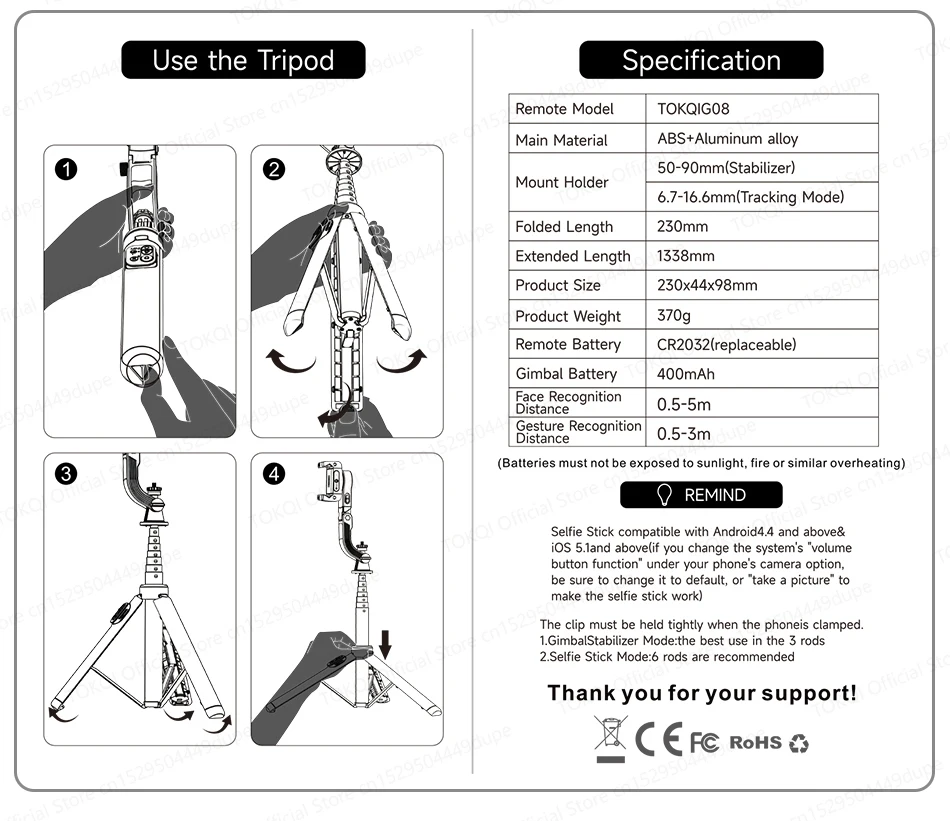
Folded Length: 230mm
High-concerned chemical: none
Material: ABS+Aluminum Alloy
Maximum Expansion Length: 1338mm
Origin: Mainland China
Package: Yes
Panning Angle: /
Rolling Angle: /
Size: 230x44x98mm
Support Remote Control: Yes
Supported Mobile Device Max Size: phone width: 50-90mm; thickness: 7-14mm
Titling Angle: /
Type: handheld gimbal
Vertical Shooting: Yes
Weight (g): 370
of Axes: 1-Axis
C22 User Guide Video
C22 Gimbal
Material: ABS+Aluminum Alloy
Communication: Bluetooth
Supported Mobile Device Max Size: Smartphone width: 50-90mm; thickness: 7-14mm
Weight: 370g
Remote Control Battery: CR2032 (Replaceable)
Compatibility: Android 8.0+/iOS 13.4+
C22 AI Tracking Gimbal Desktop Tripod
1. Independent lens, Ai intelligent tracking.
2. Intelligent anti-shake core, walking and running to take pictures.
3.3 in 1, not only stabilizer, but also tracking gimbal and selfie stick.
4. Detachable multi-function remote control, with APP, more template shooting.
5.Stable tripod.
6.High-end stable aluminum alloy rod.
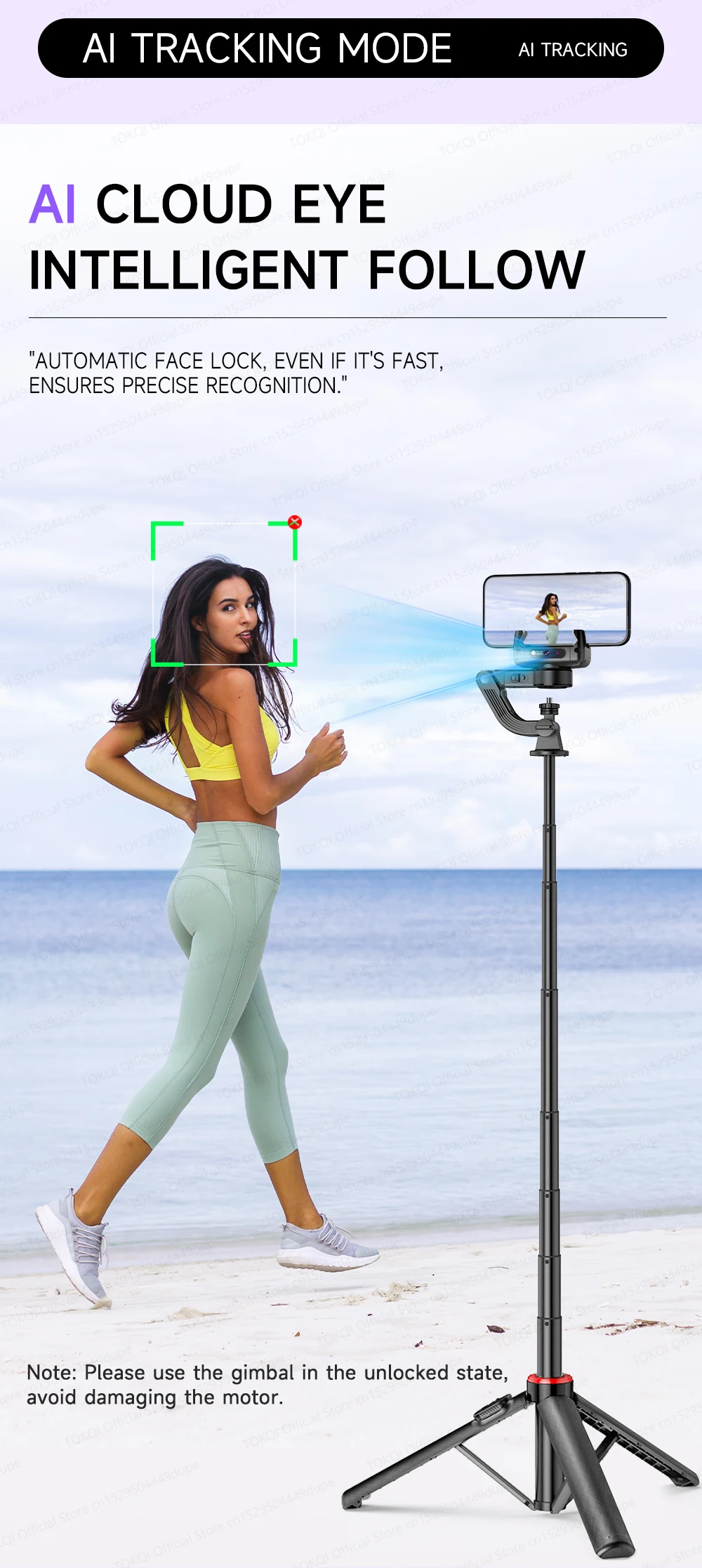
AI Tracking Mode
Note: Please use the gimbal in the unlocked state, avoid damaging the motor.
Desktop Followers
Suitable for live broadcast, online education
and conference recording
Handheld Tracking
Ideal for travel photography and vlogging Recording.
The AI Camera Is Locked In The "C” Position
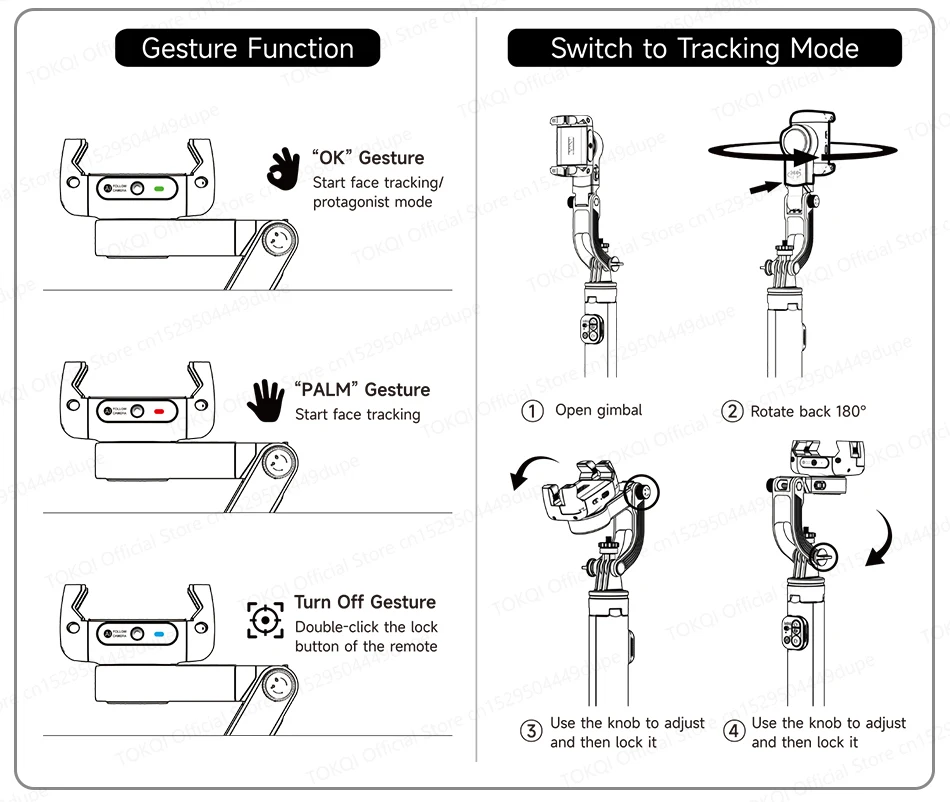
Gesture control tracking on/off.
-“OK” Protagoniset Mode:
You, always in “c” position.
-Lock You In Even If You're Covered
A shory cover-up won't stop tracking.
-360° Surround Shot
Seconds of panoramic blockbuster.
-Eleavtion Shot
Shooting for creative perspective
Stabilizer Mode
No matter how you shoot, It stays stable!
Intelligent Movement gyroscope
Intelligent anti-shake function for follow-up shooting, easy to shoot.
-360° Spin Shot
-Sport Steady Shot
-Low Angle Shot
-Travel Vlog
Selfie Stick Mode
Stabilized tripods for professional and stable shooting.
1.338m/52.68in Perfect Length
Quick switch to selfie stick.
Rear shotsare clearer.
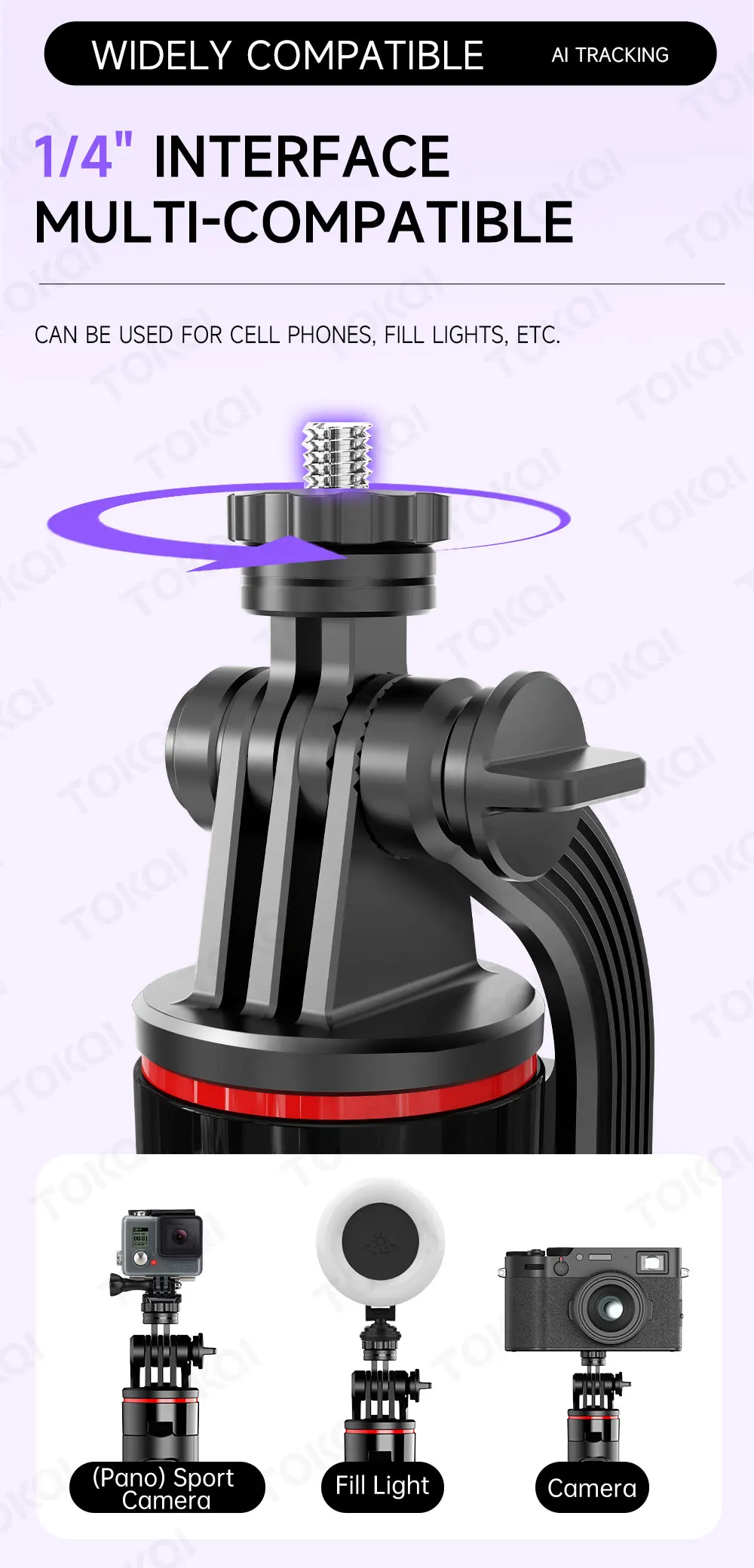
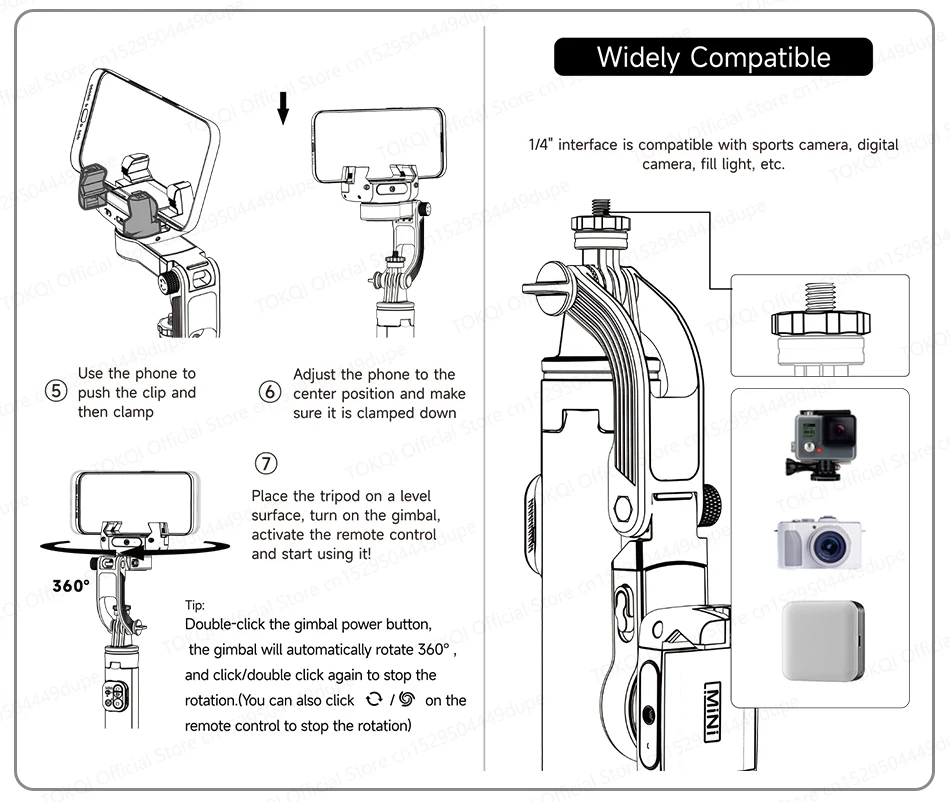
Widely Compatible
1/4" Interface Multi-compatible
Can be used for cell phones, fill-in lights, etc.
Optional DO7 Ring Light
3 color and 3 brightness for each color.
Remote Control
Embedded Design
1.Shooting
2.Stabilizer mode
-Spinshot
-Pov mode
-Horizontal and vertical
3.AI Tracking Mode
-Rotation
-Gesture Function
Pocket-sized And Portable
With APP (Gimbal Show)
-Face Filter
-Smart Tracking
-Gesture Function
-PANO & CloneMe
-DYNA-ZOOM
-TIMELAPSE
Product Parameters
C22 AI Gimbal Stabilizer User Manual
1. Part Description
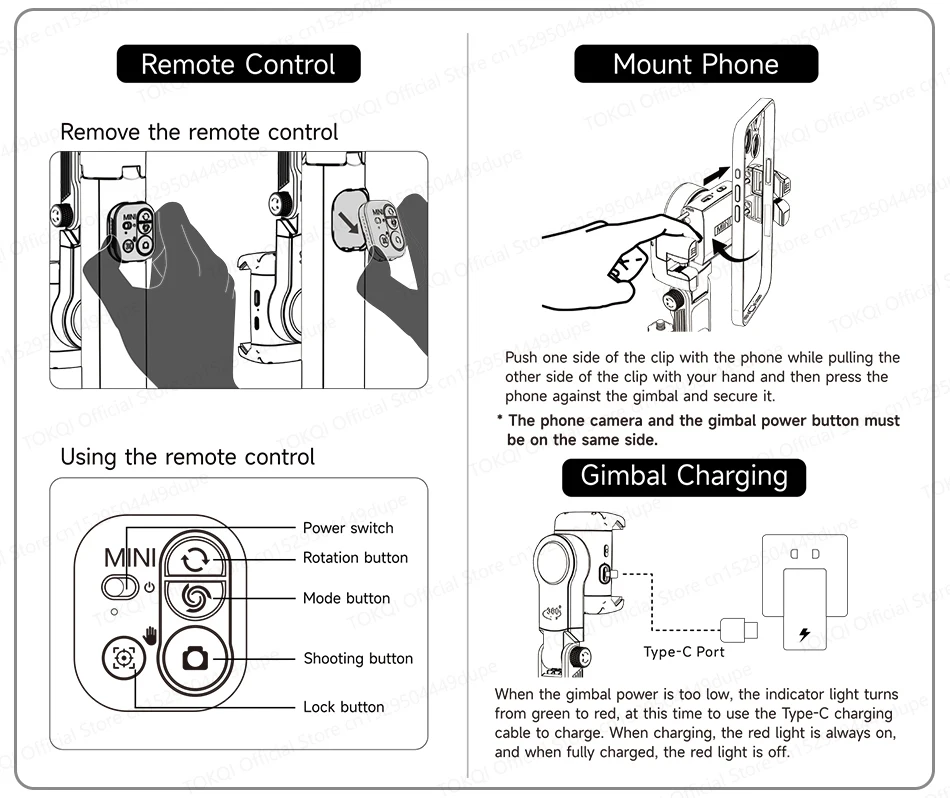
2. Remote Control
Remove the remote control.
Using the remote control.
3.Mount Phone
Push one side of the clip with the phone while pulling the other side of the clip with your hand and then press the phone against the gimbal and secure it.
* The phone camera and the gimbal power button must be on the same side.
4. Gimbal Charging
When the gimbal power is too low, the indicator light turns from green to red, at this time to use the Type-C charging cable to charge. When charging, the red light is always on, and when fully charged, the red light is off.
5. Wireless Connection
First time connection:
---Mount the phone in the center of the phone clip
---Long press the gimbal power button to turn on the gimbal, the green light flashes to enter the pairing state, search for “Gimbal Al-XXXXXX” in the phone to match, after successful pairing, the green light is always on.
*The phone camera and the gimbal power button must be on the same side.
6.Stabilizer Mode
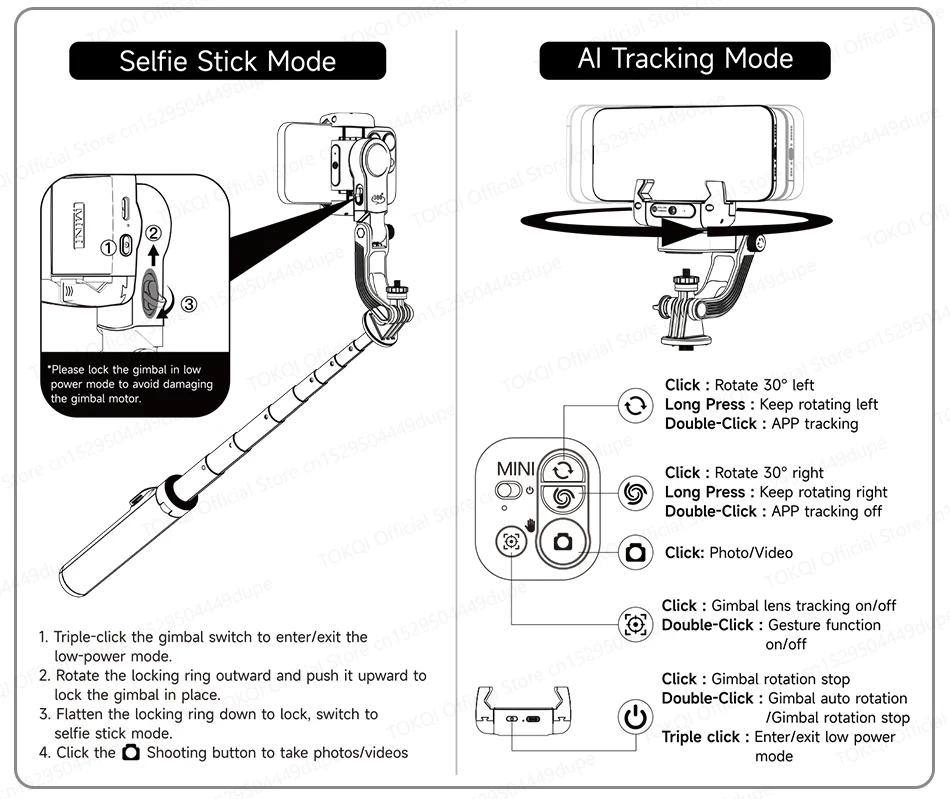
7. Selfie Stick Mode
*Please lock the gimbal in low power mode to avoid damaging the gimbal motor.
8. AI Tracking Mode
9.Gesture Function
10.Switch to Tracking Mode
11.Widely Compatible
12. Use the Tripod
13.Specification
Powered by skin-loving ingredients

Lemon Extract
Brightens and refreshes tired, dull skin

Centella Asiatica
Soothes and supports skin recovery

Zinc Oxide
Shields skin from harmful UVA and UVB rays

Hyaluronic Acid
Deeply hydrates and locks in moisture

Vitamin E
Protects skin from environmental stressors
How to use GemShield sunscreen
Start with clean skin
Apply a generous amount evenly on clean skin before sun exposure for daily protection

Keep protection active
Reapply every two hours especially after sweating swimming or towel drying to maintain protection

Make it a habit
Use every morning as the final step of your skincare routine for best long term results

What our customers are saying


See the difference clearly
Compare GemShield with others and discover better protection and comfort


